How to Download YouTube Videos With Subtitles (2026 Guide)
Today, YouTube serves as the world’s largest decentralized academy. We dump hours into watching long online videos to learn complex professional skills, master foreign languages. Yet, within these massive video timelines, the truly critical information you actually need usually lasts only a few minutes.
That's how downloading Youtube videos with subtitles becomes so useful and time-saving. By pairing your video files with precise text, you give yourself total environmental flexibility and turn passive viewing into an active, searchable learning experience.
This 2026 ultimate guide will show you how to download any Youtube video alongside highly accurate subtitles for step by step. You'll find it important to choose a good subtitle extractors.
Why You Need YouTube Videos with Subtitles
Downloading YouTube videos with their subtitles isn't just a basic trick. It is also a massive power move for anyone to learn, create, or work efficiently. Here’s why:
Overcoming Global Accents & Fast-Paced Dialogue
YouTube features creators, professors, and experts from every corner of the globe. While their insights are invaluable, thick accents, fast talking speed, or poor microphone quality can make them difficult to understand. Subtitles act as a visual anchor, ensuring you catch every complex technical term, industry jargon, or crucial metric without having to constantly rewind.
Mastering Natural Slangs & Idioms
YouTube is where native speakers use actual slang, modern contractions, and cultural idioms. Downloading subtitles gives you a permanent written record of colloquial phrases that you won’t find in standard dictionaries. By analyzing the exact text alongside the speaker's emotional tone, you quickly learn how people actually talk, helping you sound like a local rather than a textbook.
Flexibility in Noisy & Silent Environment
Your best learning moments rarely happen in a perfectly quiet room. Whether you are studying in a silent university library, commuting on a loud subway train, or reviewing a business webinar late at night while family members are asleep, subtitles let you learn anywhere, regardless of noise levels. You can absorb 100% of the video’s knowledge with the volume turned completely off.
Step-by-Step: How to Download YouTube Videos With Subtitles
Step 1 Open the YouTube Subtitle Downloader Page for Free
Navigate to our web-based AI Video Summarizer & Subtitle Downloader. There is no need to download third-party software, install browser extensions, or sign up for expensive monthly subscriptions. The tool is 100% cloud-based, completely free, and ready to use instantly.
Step 2 Copy and Paste the YouTube Video URL
Head over to YouTube and locate the video you want to process. Copy the video’s link directly from your browser's address bar (or click the "Share" button and copy the link). Return to our downloader page, paste the URL into the prominent input field, and click "Try Generate Subtitle."
Step 3 Review the Transcript
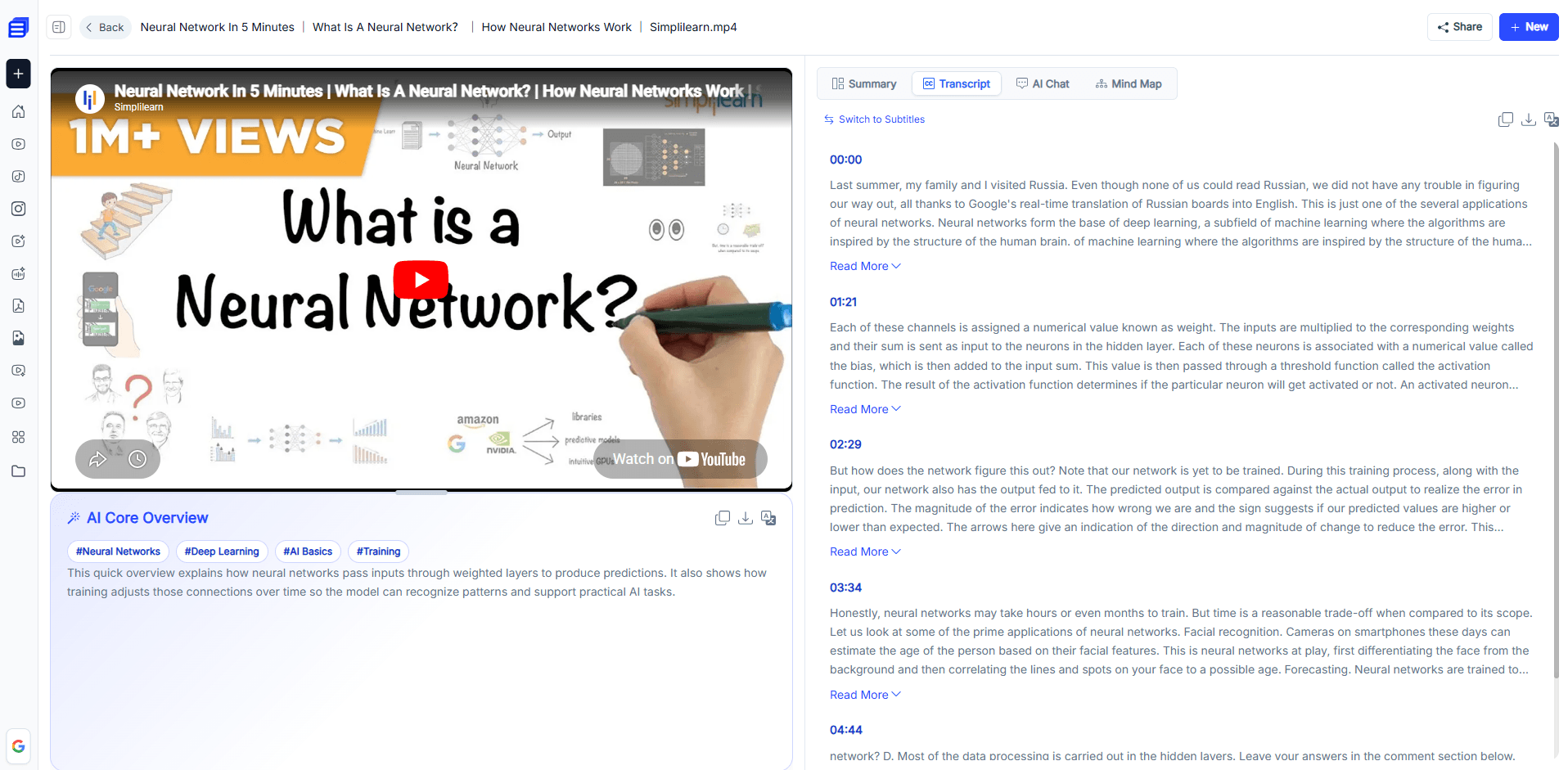
Within seconds, our advanced engine will analyze the video's audio track within seconds. The page will refresh to show you an organized, time-stamped transcript alongside an automated structural summary. At this stage, you will see an AI core overview along with some tags, which you can copy and download. Even a mind map is ready for you.
Step 4 Download and Share
Once you are ready to save the data offline, click the "Download" and feel free to share the results with your team, classmates, or social media followers.
Try All-in-One Subtitle Downloader Instantly
Common Use Cases for Downloading Videos with Subtitles
For Students and Researchers
Instead of taking notes during a fast-paced YouTube videos or online tutorials, learners can download the complete transcript to create concise study guides. An AI-powered video tool allows you to find useful information more efficiently.
For Content Creators
Creators can transform an extracted subtitle file into secondary content formats, turning one YouTube video into high-ranking SEO blog posts, newsletter articles, or social media threads.
For Language Learners
In the information era, learners can pause and repeat spoken sentences exactly as written, practicing natural cadence, rhythm, and mouth movements at their own pace.
For Daily Users
Saving critical information as local documents lets you preserve knowledge without cluttering your hard drive. Daily users can review dense podcasts, news reports, or product reviews like an article, bypassing annoying visual ads and video padding.
How to Repurpose Your Video Subtitles
Here is how you can transform raw subtitles into a high-powered, highly reusable knowledge asset:
1. Interactive "Chat with Video" AI Assistant
The interactive AI chat window allows you to ask targeted follow-up questions about the video’s content. You can type commands like, "What specific tools did the speaker recommend at the 12-minute mark?" or "Summarize the pros and cons discussed in the second chapter," and the AI will pull the exact answer alongside verified timestamps instantly.
2. Time-Stamped Chapters
Drowning in a massive, continuous video timeline can completely stall your learning momentum. The AI solves this by intelligently analyzing the narrative flow of the video and automatically breaking it down into logical, structured chapters. Each chapter comes with a clickable timestamp, letting you jump straight to the insights you actually need.
3. Seamless Multi-Language
Language barriers vanish completely with built-in AI translation capabilities. If the essential lecture, documentary, or industry briefing you need is spoken in a foreign language like Japanese, Spanish, or German, the AI translates the audio track on the fly. It generates perfectly synchronized, natural subtitles in your native language, making global knowledge immediately accessible.
4. Multi-Format Subtitle Export
Flexibility is key to a fast workflow. Our tool allows you to export your generated summaries, transcripts, and subtitles in four formats. Whether you need a TXT, PDF, Word or SRT, you can save your text in whatever format best fits your digital ecosystem.
Getting your hands on a video's subtitle file is only step one. The real magic happens when you stop treating text as a passive script and start using AI to unpack, interact with, and repurpose that data.
FAQs:
Can AI Video Summarizer handle long videos?
Yes. Our engine is optimized to process videos of any length, from short clips to multi-hour lectures and webinars.
Is this AI tool completely free to use, or are there hidden costs?
It is 100% free with no hidden costs. There are no paywalls, no credit card requirements, and no limited trials—just full access to all core features.
How long does AI Video Summarizer take to process a YouTube video?
Typically, the tool generates a transcript and summary within seconds to a few minutes, depending on the video length.
Conclusion
In conclusion, downloading YouTube videos with subtitles is no longer a luxury. With the right AI-powered tool, you can transform hours of passive video watching into an interactive, searchable, and highly reusable knowledge library.
Whether you're a student cramming for exams, a creator repurposing content, or a lifelong learner exploring new topics, our Subtitle Downloader gives you everything you need—completely free and in just a few clicks.
Start downloading YouTube videos with subtitles into your personal learning assets today.